Wednesday, 27 April 2016

Saleae Logic Analyzer - analyze Manchester code (decode Manchester)


Hi,

This post I gonna show you how to decode and visualize 10 Mb/s ethernet by Saleae Logic Analyzer. I have simple and very chip module analyzer. But for test and for fun its enought. I was seeking materials about how to decode manchester by this tool but nothing I recieve. Therefore I had to do something. OK Les't go with it.
Because many people need to see and do something to understand therfore I tried to add and share necessary materials for you.
First of all this is what I need to have:

UTP Cat5e 100Mbps cable and Saleae Login Analyzer 24MHz 16 channels.
UTP is important because if you have STP cable It will be quite difficoult to slit cable.
Next we have to choose channel number (I choose channen 0). All channels are connected with colours. For example channel 0 its yellow. Its important to connect GND wire also. In this example one cable yellow is connected to Green/White wire and second is connected to Green wire. Obviously I can connect both pairs but for test I choose only 1 pair (G/W, G). My G/W and G wires are on 3 and 6 position so there are responsible for receive datas from my side.
Here below is ready setup:
  

If we have phisical environment ready we can go further. We have to modify our settings.
First you must change your NIC speed for 10Mbps. Menchester is using this speed normally:


 Next open Saleae Software. My version is Logic 1.2.7 (beta)
 Before you press "START" change logic setup. First change is how many Mega Sample per second you want to probe and how long time you need to catch it.


 Now you can start sample. One important thing. Do not add any prococols before you sample.
OK. We have some data. Show in this figure below (Use your mouse scoll to zoom in your data):

Now we must add protocol for decode so I found Manchester and I set my parameters and click Save:


And I recieve decoded data by HEX but you can also choose decode by Binary. It is not professional tool which show you all decoded ethernet frames with many groups like "preamble" or "CRC" field but for amateurs usage is good and enought I think.


This is the end of this project. I hope that this post can be helpful.
 

Network programming - Client and Server communication C#

Hi dear Guest!
This year I started playing with C#. I'm interested in networking therefore I was wondering how to connect my currently knowledge with programming. So I decided that I need to find programming language - must be flexible, quite simple and must be type RAD. I choose Visual Studio Express 2010 (free edition) with C#.
I have some experience with programming because previously sometimes I had to write some scripts and small program during my study and during my daily routine.
OK. Something about my project.
It is very simple idea. I need client applcation where I can choose host for connection (eg. localhost, remote host), must have progress bar during sending data. I must send different values from 1 to 100.
All messages must be visable. Can close connection. All data should be visable on the server side especially should be visable on the screen of Arduino.
In this figure I show you scenario:


In this fugure I show you how to looks both interfaces:


All messages will be visable on listBox1, all errors also. Checkbox localhost allows you test locally.
Turbo loader generates numbers in loop and sending to Arduino LCD.  Progress bar it is only feature.
Server has simple interface. I share my all solution (client & server) ASAP. Because in this blogger I can add only videos, images, and links no other files. I must find solution how to add my  all files.
Be patient. And I invite you to comment.

Klient: Client
Server: Server


Friday, 22 April 2016

Two project will be released next week

Hi,

Next week I want to release and describe my 2 projects.
This two project are connected with network communication.

Firs project is made of Arduino Due, LCD Display, Serial connection USB, C# network applications.
Generally I've wrote 2 programs in C#. It's client & server.

Server listening on PC which is connected with Arduino with display LCD sheeld. Between PC and arduino I using USB connectio (by COM).
Client has been done for sending data which should be display (visable) on Adruino LCD. There therefore Client should be connect by the network to server and send data. This is shor about first project.

Second project is about decode Manchester code which is used in 10BaseT Ethernet standard.
In this project I've used Saleae Logic Analyzer 24MHz with 8 channels. I've establish connection between switch and PC via ethernet cable CAT5e. Network device will be configured at 10Mb/s band. All communication will catched by Saleae Logic Analyzer and decoded by it. Manchester protocol is embeded in Saleae Sofware. Sound's good.


So, see you soon!

Friday, 25 March 2016

ADC converter (modulator)

Hello,
This is my first post regarding modulations. I'm intrested in electronic.
Recently I was wandering how to create simple converter to convert analog signal to digital.
I've found program named LTSpice it's free and very good in my opinon (it's not only my opinion).
My aim was, do the modulator as soon as possible. Must be simple and workable. I do this.

Here is electronic circuit:


I used LTC6992-1 chip.
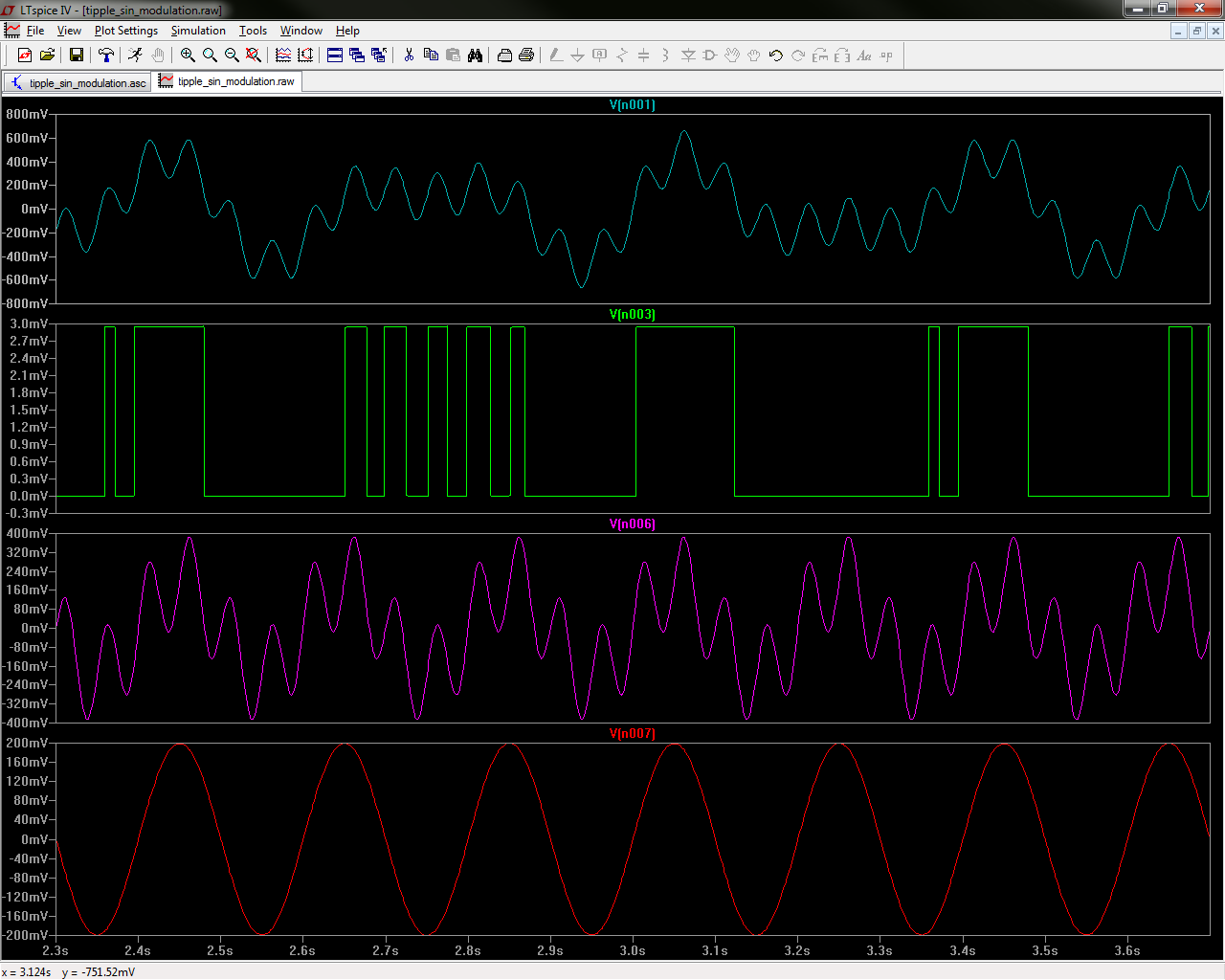
I created 1 analog signal - its my noise signal (V1)
I created next V2 my "data" and next I created V3 my analog modulated signal.
LTC6992-1 can process this signal and can geterate digital output.
 
Here is my results (waveforms with probe):


This is the end of this post. Please comment if you want. See you soon.


Tuesday, 22 December 2015

Purple belt - BJJ

This month I've got promotion for purple belt in BJJ. Previously my status was blue belt with 2 stripes. It was important thing. My hard work has been appreciated and I know that is important step for me. Although I have a little time after work. Although I must divide thime whit familly, learning, training I achieve this level. Yeeeesss! I'm veeeery happy!!
Below is our last seminar in Dec 2015 (Rio Grappling Club - Dąbrowa Górnicza)

CCNA Exam Passed!

Hello everyone!

Today is my big day. I achieved CCNA title and pass this exam with good score.
I can rest for now, its also the end of 2015 year there fore I'm starting prepairing for christmas and new year party.
I hope that new year 2016 will be good time to try go further for achieve CCNP title.
Wooooooohhhoooooo!

Tuesday, 7 July 2015

Cisco Security - IPSec Tunnels diagnose

Sometimes our great configured IPSec tunnels flapping. What is means?
That means then interfaces first shut down and by short time move up.
I will show you what should we do for diagnose this issue.

First check logs by command:

sh logg

result:

2755318: Jul  7 14:46:16: %LINEPROTO-5-UPDOWN: Line protocol on Interface Tunnel30, changed state to down
2755319: Jul  7 14:46:16: %LINEPROTO-5-UPDOWN: Line protocol on Interface Tunnel20, changed state to down
2755929: Jul  7 14:48:06: %LINEPROTO-5-UPDOWN: Line protocol on Interface Tunnel20, changed state to up
2756083: Jul  7 14:48:16: %LINEPROTO-5-UPDOWN: Line protocol on Interface Tunnel30, changed state to up


If you saw something like above then tunnel is flapping.

Next use this command for checking status of tunnels:

sh crypto isakmp sa

result:

IPv4 Crypto ISAKMP SA
dst             src             state          conn-id status
x.x.x.x     x.y.z.z        QM_IDLE           1194 ACTIVE
y.y.y.y     x.y.z.z     QM_IDLE           1193 ACTIVE


If status is ACTIVE then crypto key has been exchanged correct.
Next important command is:

sh crypto session brief

this command allow us to check status of all tunnels.
Last command is:

sh crypto session detail

In this command important is uptime parameter. It maight be useful when we want know how long tunnel is running.
This commands are useful for basic troubleshooting. In future I will write more detail information.

My IT team from Asia

They are my friends from our branch in China (Beijing). Its our IT staff from Asia.
I'm glad that I was working with this guys.


It was big plesure to work with you guys. Many thanks for all! Sie! Sie!

Monday, 18 May 2015

MyPET

Here is Snickers.
He is quadrupeds therapist.
Amazing dog with more privilages @ home.

Wednesday, 22 April 2015

EEM - Embedded Event Manager

Very useful tool for cisco admins:
Look below. Here is my script which I use daily. In working hours I must use limitation for DFS traffic from our local machines. I did not have time for create complicated script so my idea is simple: "Remove QoS policy from interface where limit is active by selected period" after specified time I add QoS policy to interface again.

Look:

event manager applet DISABLE_DFS_LIMIT_WEEK
 event timer cron cron-entry "10 18 * * 1-5"
 action 1.0 cli command "enable"
 action 2.0 cli command "configure terminal"
 action 3.0 cli command "interface GigabitEthernet0/1"
 action 4.0 cli command "no service-policy input QOS_MARKING"
 action 5.0 mail server "$_email_server" to "$_email_to" from "$_email_from" subject "routername1: Bandwidth limit between X and Y is uncontrolled"
 

This same script you can use for enable but must change only cron settings and one command. Look at bold and underline fonts.

Usefull mdf file - Embedded Menu Manager


Here is created file named *.mdf.
You can run this file using "emm" tool include cisco IOS.
MDF file allows you to create menu with many functions. It is very useful for administrators who using many of this same function to analyse, diagnose, or checking network parameters. MDF - using XML language. You can use ISO commands include XML, you can use TCL scripts also.
Here is simple mdf file which I created and moved to router. If you want to run this file use:
emm mdf flash:/menu_cisco.mdf   <Menu MenuName="Cisco Menu" schemaVersion="1.1">
 <MenuTitle>
  </MenuTitle>
  
   <Item ContinuePrompt="true">
    <ItemTitle>
    <Constant String="Show processor utilization chart" />
    </ItemTitle>
    <IOSExecCommand>"sh processes cpu history"</IOSExecCommand>
   </Item>
 
  <Item ContinuePrompt="true">
   <ItemTitle>
   <Constant String="Show most wanted process in CPU" />
   </ItemTitle>
   <IOSExecCommand>"sh processes cpu sorted | exclude 0.0"</IOSExecCommand>
  </Item>
 
  <Item ContinuePrompt="true">
   <ItemTitle>
   <Constant String="Show remote users" />
   </ItemTitle>
   <IOSExecCommand>"sh crypto session brief | inc remote"</IOSExecCommand>
  </Item>

 <Item ContinuePrompt="true">
  <ItemTitle>
  <Constant String="Show all crypto sessions tunnels users" />
  </ItemTitle>
  <IOSExecCommand>"sh crypto ISakmp SA"</IOSExecCommand>
 </Item>

 <Item ContinuePrompt="true">
  <ItemTitle>
  <Constant String="Show most wanted process in CPU" />
  </ItemTitle>
  <IOSExecCommand>"sh processes cpu sorted | exclude 0.0"</IOSExecCommand>
 </Item>

 <Item>
    <ItemTitle>
        <Constant String="Exit" />
    </ItemTitle>
 </Item>
</Menu>
  Result: 1. Show processor utilization chart
2. Show most wanted process in CPU
3. Show remote users
4. Show all crypto sessions tunnels users
5. Show most wanted process in CPU
6. Exit

Enter selection: 2
CPU utilization for five seconds: 1%/0%; one minute: 2%; five minutes: 2%
 PID Runtime(ms)     Invoked      uSecs   5Sec   1Min   5Min TTY Process
 377      354512  1655186684          0  0.39%  0.40%  0.40%   0 IP SLAs XOS Even
 107      244464    26615162          9  0.23%  0.19%  0.18%   0 Netclock Backgro
 136      136484   843191441          0  0.15%  0.11%  0.10%   0 Ethernet Msec Ti
  88      230716     6654995         34  0.15%  0.13%  0.15%   0 Per-Second Jobs


Press any key to continue...
  

Wednesday, 18 March 2015

Polycom RealPresence Desktop & Active Dircetory communication

Real Presence Desktop (RDP) is a program which you can: share your desktop with the other person, established video connection to other person who have RPD, chat and allows connection to video conference room. This program needs Windows AD service for authenticate users in domain. I will show you how looks communication between RPD and AD to authenticate user.
I decided that I will be using shortcut for easy notification. In this scenario:
RPD is a Polycom server AD is a Windows Server with 2008R2 operating system.

Let's start:

RPD -> AD = DNS QUERY
AD -> RPD = DNS RESPONSE
RPD <-> AD = SYN,SYN ACK
RPD -> AD = NBSS SESSION REQUEST
AD -> RPD = NBSS POSITIVE SESSION RESPONSE
RPD -> AD = SMB NEGOTIATE PROTOCOL REQUEST
AD -> RPD = SMB NEGOTIATE PROTOCOL RESPONSE
RPD -> AD = SMB SESSION SETUP ANDX REQUEST, NTLMSSP_NEGOTIATE
AD -> RPD = SMB SESSION SETUP ANDX RESPONSE, NTLMSSP_CHALLENGE, ERROR: STATUS_MORE_PROCESSING_REQUIRED
RPD -> AD = SMB SESSION SETUP ANDX REQUEST, NTLMSSP_AUTH, USER: domena\nazwa_komputera
AD -> RPD = SMB SESSION SETUP ANDX RESPONSE
AD -> RPD = SMB TREE CONNECT ANDX RESPONSE
AD -> RPD = SMB NT CREATE ANDX RESPONSE
RPD -> AD = DCERPC BIND: CALL_ID: XXX
RPD -> AD = LSARPC LSA_OPENPOLICY2 REQUEST
AD -> RPD = LSARPC LSA_OPENPOLICY2 RESPONSE
AD -> RPD = LSARPC LSA_QUERYINFOPOLICY RESONSE
RPD -> AD = LSARPC LSA_CLOSE REQUEST
RPD -> AD = SMB CLOSE REQUEST
AD -> RPD = SMB CLOSE RESPONSE
RPD -> AD = NT CREATE ANDX REQUEST, PATH: \NETLOGON
AD -> RPD = NT CREATE ANDX RESPONSE FID: XxXXXX
AD -> RPD = DCERPC CALL_ID: XXX .. RESULT: ACCEPTANCE
RPD -> AD = RPC_NET NETSERVERREQCHALLENGE REQUEST
AD -> RPD = RPC_NET NETSERVERREQCHALLENGE RESPONSE
RPD -> AD = RPC_NET NETSERVERAUTHENTICATE2 REQUEST
AD -> RPD = RPC_NET NETSERVERAUTHENTICATE 2 RESPONSE
AD -> RPD - RPC_NET NETLOGONSAMLOGON RESONSE

MANY ACK, RST, ACK AND RETRANSIMISSION ALSO

RPD -> AD = RPC_NET NETLOGONSAMLOGON REQUEST
AD -> RPD = RPC_NET NETLOGONSAMLOGON RESPONSE


I dropped many duplicate TCP [ack] AND other retransmissions. If you have any problem with communication between, you can compare this communication and find differences to resolve your problem. If you are a programmer this type communication maybe it can be interesting for you.


Monday, 9 March 2015

Usefull commands for admins (cisco router)

How to check who is using EZ VPN:
sh crypto session brief

How to check VPN tunnel/tunnels status:
sh crypto isakmp sa

Show IP NAT translations include IP
sh ip nat translations | inc x.x.x.x

How to verify QoS policy:
sh policy-map interface type x/x

Show me neighbor devices (CDP must be enable):
sh cdp neighbors

Wednesday, 4 March 2015

How to export certificate from ASA to JAVA (self-signed)

I want to show you how export security certificate from Cisco ASA 5520 and import to Java. First of all we have to this command for show your truspoint:

asa1(config)# sh crypto ca trustpoints

Next we are using export to pem file (must write name of trustpoint):

asa1(config)# crypto ca export TRUST_NAME identity-certificate

you will see:
-----BEGIN CERTIFICATE----- MIIB+zCCAWSgAwIBAgIEJqphUTANBgkqhkiG9w0BAQUFADBCMRMwEQYDVQQDEwpD TkJFSUZXRDAxMSswKQYJKoZIhvcNAQkCFhxDTkJFSUZXRDAxLmRwY2xlYW50ZWNo LmxvY2FsMB4XDTEzMTEwNjE1MzQwOFoXDTIzMTEwNDE1MzQwOFowQjETMBEGA1UE .. -----END CERTIFICATE-----

Next you must copy this all text from console and paste in text file (notepad) and save as *.CSR

Next open Java Control Panel, go to Security tab and run Manage Certificates button. You shoud see Certificates window. Select Certificate Type like "secure site" and import your file. Now you can open your ASDM via web browser using Java.

Contact with me

Name

Email *

Message *